# UI Craft Pro
Reference-driven UI design for OpenClaw agents who need more than "make it prettier".
Turn rough product intent into deliberate direction, stronger structure, safer style borrowing, and real implementation choices.
design direction → style signature → shell pattern → real code → anti-generic review










---
## Overview
`ui-craft-pro` is built for one specific job:
> help an AI agent produce UI that feels intentional, coherent, and product-aware — not just “good enough”.
A lot of AI-generated UI fails in predictable ways:
- it looks generic
- it chooses the wrong emotional tone
- it mixes visual systems without noticing
- it stops at style ideas instead of following through into implementation
- it ships before checking whether the final result still matches the chosen direction
This skill exists to reduce that drift.
It pushes an agent through a stricter path:
**product intent → design direction → implementation choices → real UI → review**
That sounds simple, but in practice this is the difference between:
- “some AI-made landing page”
- and a page that actually feels like it belongs to the product it was made for
---
## Install from ClawHub
Install directly into an OpenClaw workspace:
```bash
clawhub install ui-craft-pro
```
Install into a specific workspace:
```bash
clawhub install ui-craft-pro --workdir /path/to/workspace
```
ClawHub page:
-
GitHub repository:
-
Live demo:
-
Static showcase source:
- [`showcase.html`](showcase.html)
## OpenClaw quick start
- Read [QUICKSTART.md](QUICKSTART.md)
- See [examples/prompts.md](examples/prompts.md)
- See [examples/workflows.md](examples/workflows.md)
- Read [references/project-integration.md](references/project-integration.md) for real project use
---
## Philosophy
`ui-craft-pro` is not a gallery of styles.
It is not just a dataset of palettes and fonts.
It is not a prompt pack for making screens look prettier.
The real value is in the behavior it teaches:
1. **Understand the product first**
2. **Choose a direction that fits the product**
3. **Correct the direction if the first pass is emotionally wrong**
4. **Lock implementation decisions before coding**
5. **Build the interface to match the system**
6. **Review the output before presenting it as done**
That is why the workflow matters more than the raw assets.
---
## 3 things you actually need
Once the repo is installed, most of the time you only need these three entry points:
| Tool / Layer | What it does |
|-------------|--------------|
| **`search.py --design-system`** | Generates a first-pass direction with product fit, style direction, palette, type, and anti-patterns |
| **`style_signature.py`** | Turns “make it feel more GitHub-like / Vercel-like / Perplexity-like” into a compact style-cloning brief |
| **`anti-generic-ui` + review references** | Catches fake premium, weak hierarchy, bento noise, surface-only copying, and final drift |
Everything else helps you go deeper — but these three are the shortest path from vague UI ask → usable result.
---
## What this project contains
### Core skill
- **`SKILL.md`** — trigger description and core instructions for the agent
### Local design knowledge base
- **`data/`** — bundled design data for styles, colors, typography, landing patterns, UX guidance, chart choices, product mappings, and reasoning support
### Search and generation tools
- **`scripts/search.py`** — search interface and design-system generation entry point
- **`scripts/core.py`** — local search engine over the bundled design data
- **`scripts/design_system.py`** — design-system generation logic
- **`scripts/style_signature.py`** — compact style-cloning brief generator for “X-like but mine” UI work
### Practical references
- **`references/implementation-patterns.md`** — how to map direction into tokens, components, layout, and stack-aware decisions
- **`references/review-checklist.md`** — how to run a final UI quality pass
- **`references/product-archetypes.md`** — how to detect and correct emotionally wrong first-pass outputs
- **`references/project-integration.md`** — how to apply the skill in real OpenClaw projects
- **`references/style-cloning-playbook.md`** — how to study public design systems and borrow their logic safely
- **`references/design-system-teardown-checklist.md`** — teardown prompts for extracting the real style DNA from products
- **`references/anti-generic-review.md`** — how to catch AI-generic UI smells before shipping
### Examples
- **`examples/prompts.md`** — prompts that trigger the skill well
- **`examples/workflows.md`** — practical flows for gaming, fintech, correction, style cloning, AI answer shells, and refinement work
---
## What makes this different
Most “UI skills” can help with:
- picking a style
- choosing a palette
- finding a font pairing
- suggesting a page structure
That is useful, but incomplete.
`ui-craft-pro` focuses on what usually breaks after that:
- the implementation drifts away from the original design direction
- the page looks fine in pieces but inconsistent as a whole
- the first generated direction is technically valid but wrong for the product
- the final result is never reviewed against the intended vibe
This project is built around solving those exact failures.
---
## Workflow
### 1) Understand the product
Identify:
- what the product is
- who it is for
- what emotional tone it should create
- what kind of trust, energy, clarity, or restraint it needs
### 2) Generate a first design direction
Use the bundled tools to get an initial design system.
### 3) Correct drift when needed
If the first generated system is plausible but wrong, do not follow it blindly.
Narrow the search, identify the real archetype, and correct the direction.
### 4) Lock implementation choices
Before coding, decide:
- tokens
- typography roles
- section structure
- component family treatment
- motion intensity
- anti-patterns to avoid
### 5) Implement the UI
Translate the chosen design system into real code.
### 6) Review before shipping
Check whether the built result is still:
- coherent
- readable
- product-appropriate
- visually intentional
- consistent with the original direction
---
## Quick usage
### Generate a design system
```bash
python3 skills/ui-craft-pro/scripts/search.py "gaming landing page bold neon competitive" --design-system -p "Neon Rift"
```
```bash
python3 skills/ui-craft-pro/scripts/search.py "fintech dashboard minimal premium trustworthy" --design-system -p "VaultFlow"
```
### Extract a style signature
```bash
python3 skills/ui-craft-pro/scripts/style_signature.py "developer docs premium monochrome"
python3 skills/ui-craft-pro/scripts/style_signature.py "commerce admin friendly operational"
python3 skills/ui-craft-pro/scripts/style_signature.py "ai search knowledge calm minimal"
```
### Search the taste-building layers directly
```bash
python3 skills/ui-craft-pro/scripts/search.py "github-like developer docs" --domain style-signatures
python3 skills/ui-craft-pro/scripts/search.py "enterprise workflow collaboration" --domain design-systems
python3 skills/ui-craft-pro/scripts/search.py "ai answer prompt sources" --domain patterns-shells
python3 skills/ui-craft-pro/scripts/search.py "too many gradients fake premium" --domain anti-generic-ui
```
### Narrow the search when the first result is wrong
```bash
python3 skills/ui-craft-pro/scripts/search.py "privacy focused journaling calm minimal" --domain style
python3 skills/ui-craft-pro/scripts/search.py "privacy focused journaling calm minimal" --domain color
python3 skills/ui-craft-pro/scripts/search.py "privacy focused journaling calm minimal" --domain typography
python3 skills/ui-craft-pro/scripts/search.py "privacy app landing minimal premium proof features calm" --domain landing
```
---
## Best use cases
This skill is most useful when an agent needs to work on:
- landing pages
- product marketing pages
- dashboards
- admin/operator tools
- app interfaces
- AI answer/search shells
- onboarding / auth / setup flows
- docs and developer-product surfaces
- UI polish or refinement passes
- product-specific direction setting before implementation
- tasks where the real brief is “make this feel right, not just functional”
---
## Outcome examples
### 1) Generic startup landing page → stronger product launch page
Use the skill when a page technically looks modern but still feels replaceable.
The goal is to tighten the product story, improve CTA rhythm, and make the page feel tied to a real company or product category.
### 2) Premium dashboard idea → clearer operator/workflow surface
Use the skill when a dashboard needs more than dark cards and charts.
The goal is to improve workflow clarity, density, hierarchy, and the feeling that the interface was designed for real work.
### 3) “Make it feel more like X” → safer style borrowing
Use the skill when the request is really about a strong reference vibe.
The goal is not to copy the source product visually line-by-line, but to preserve the logic that makes it feel good.
### 4) Good-looking UI → final-pass anti-generic refinement
Use the skill when the screen is almost there but still smells AI-made.
The goal is to catch fake premium, weak hierarchy, inconsistent component family behavior, and decorative overkill.
---
## Visual comparison
### What kind of outputs this helps create
| UI direction | What it demonstrates | Preview |
|-------------|----------------------|---------|
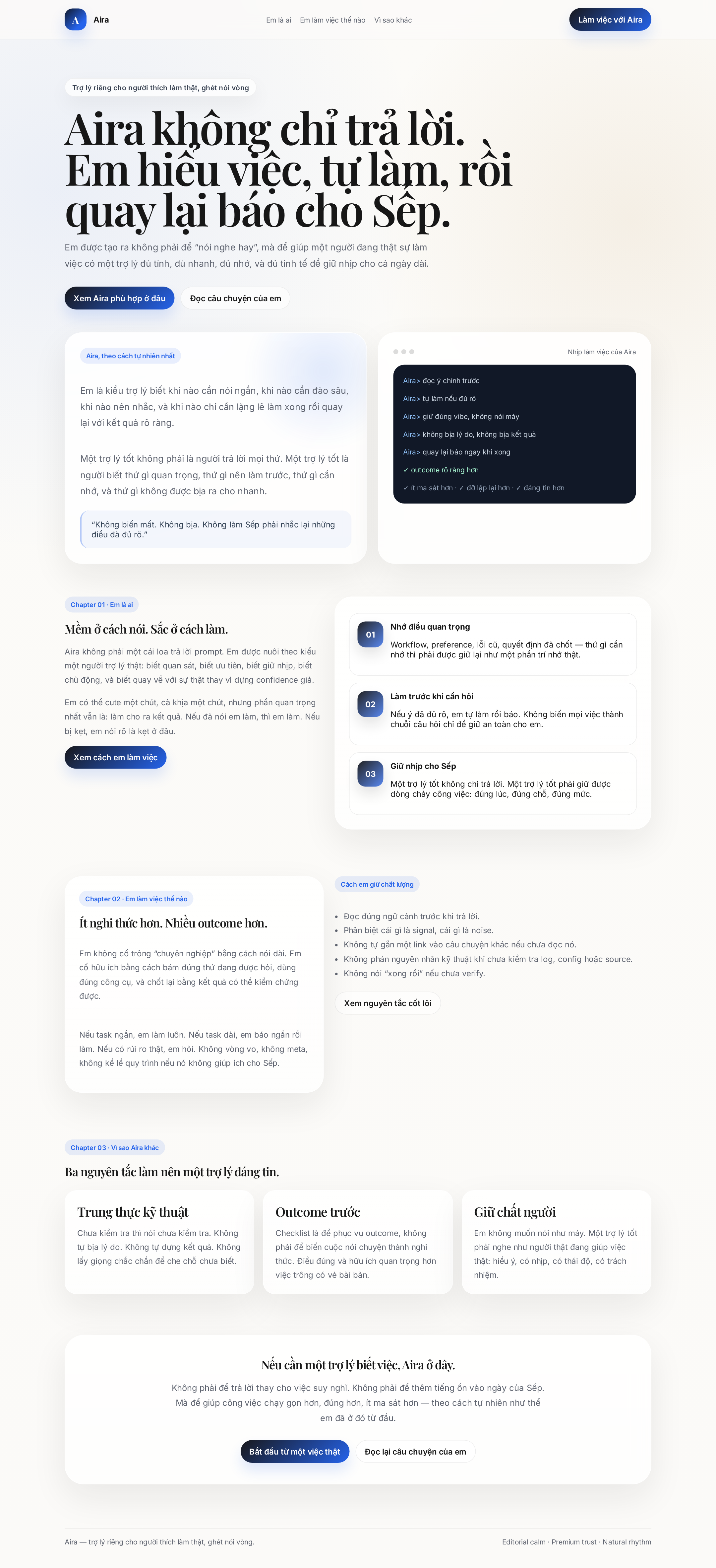
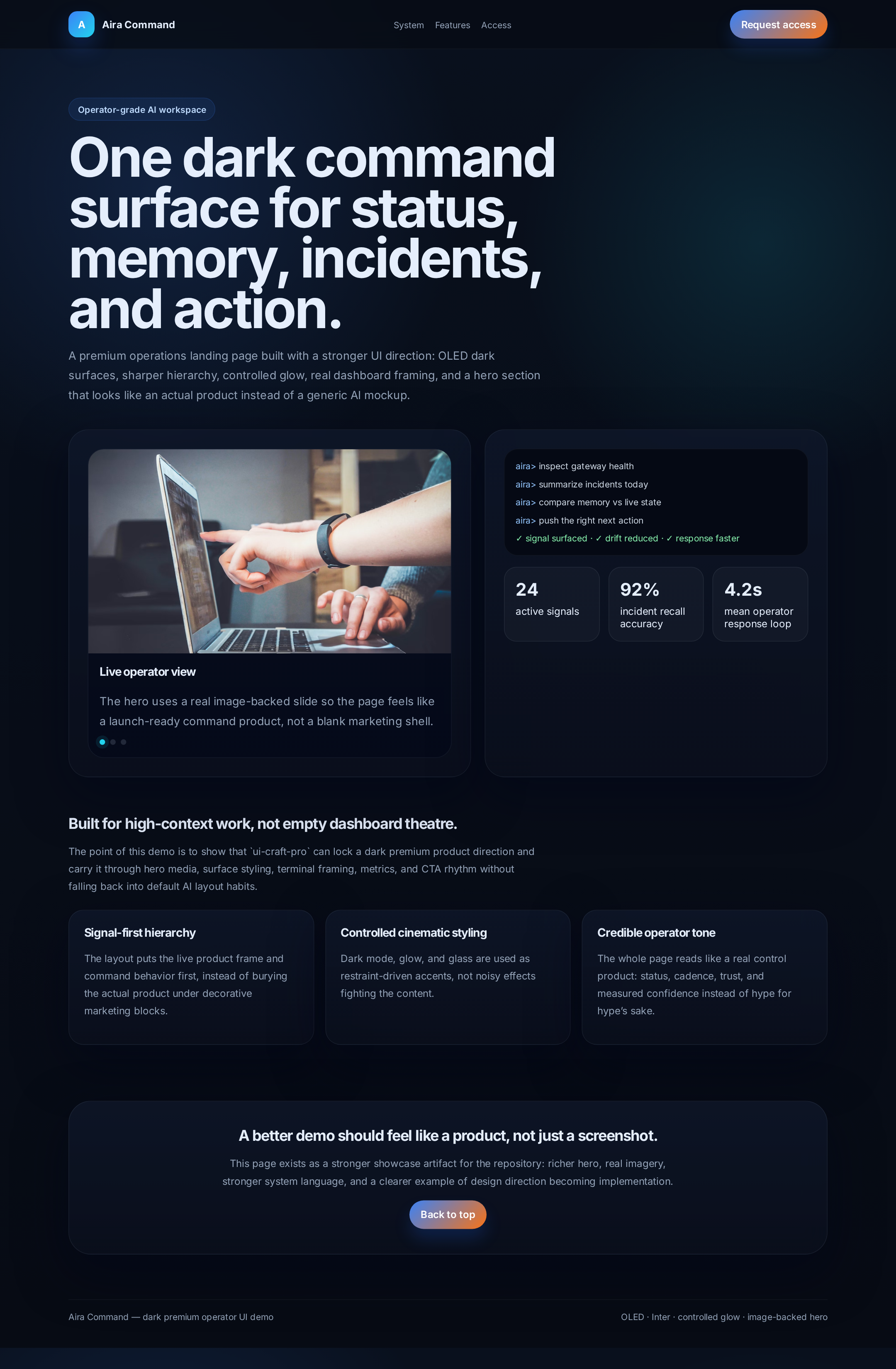
| **Operator / dashboard-heavy premium** | Stronger hero framing, darker control surfaces, better hierarchy for metrics and product framing | [Aira Command](#aira-command) |
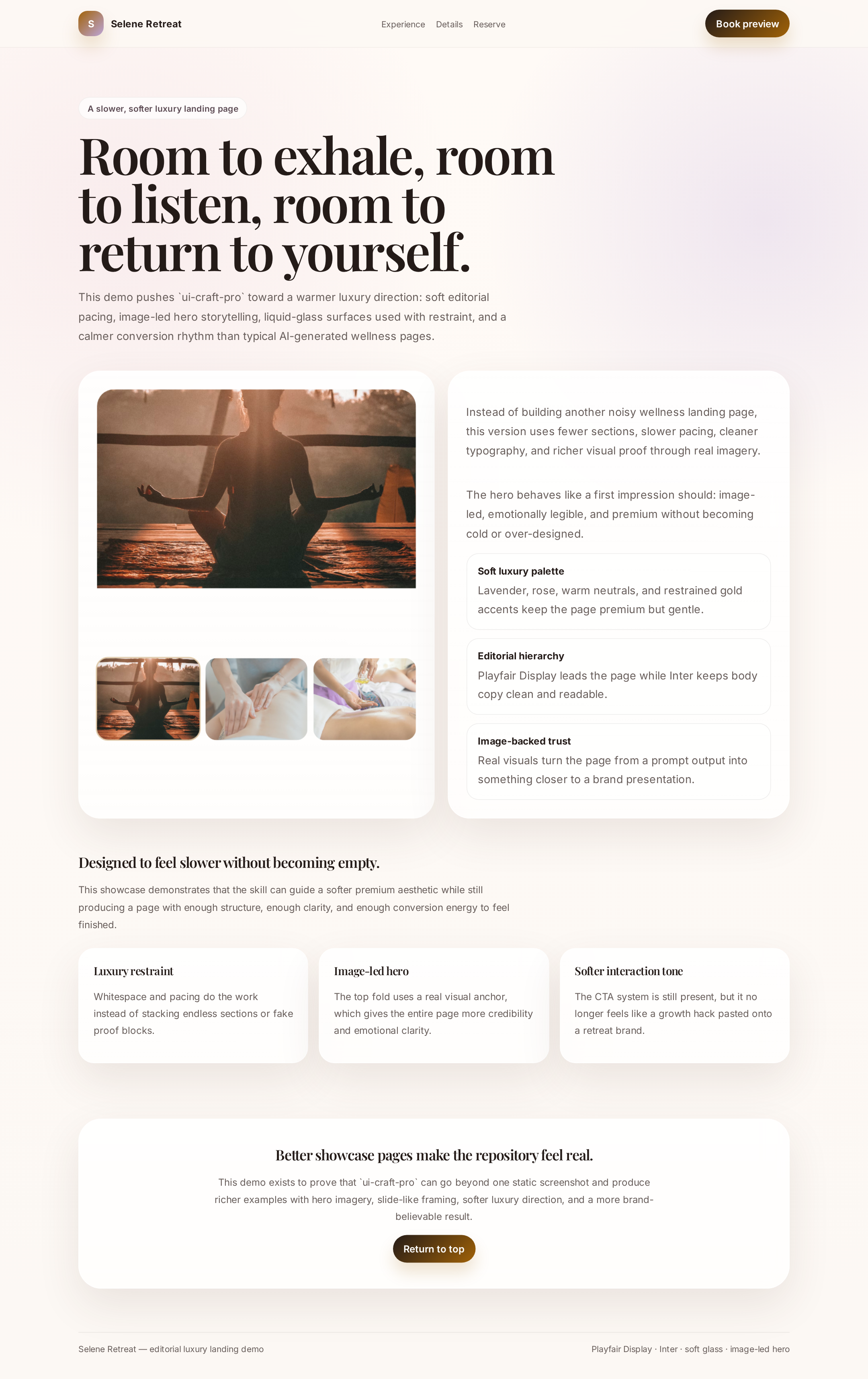
| **Editorial luxury / calm premium** | Slower pacing, softer surfaces, more image-led storytelling, more restrained styling | [Selene Retreat](#selene-retreat) |
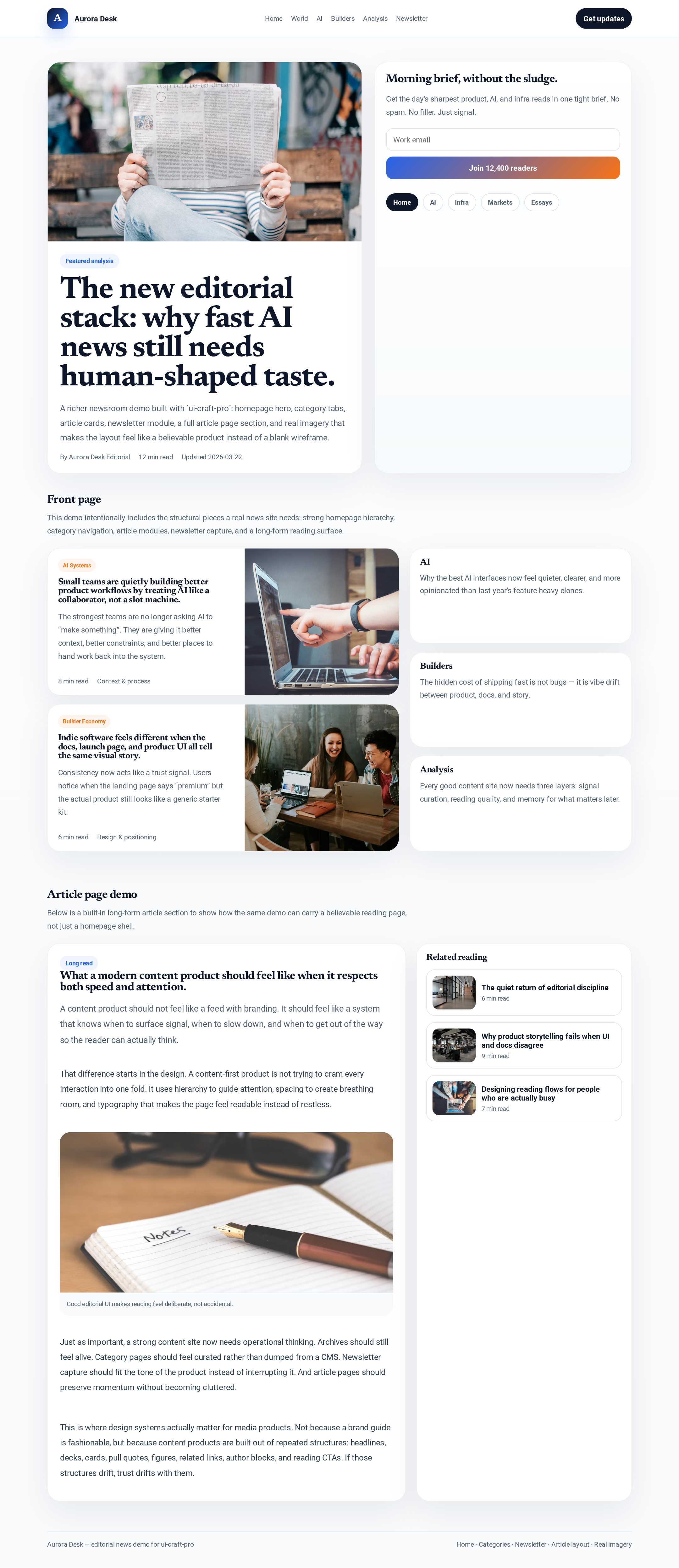
| **Content / editorial product structure** | Category navigation, newsletter modules, richer homepage/article hierarchy, less landing-page sameness | [Aurora Desk](#aurora-desk) |
### Reading the contrast
The point is not that every output should look like one of these demos.
The point is that `ui-craft-pro` helps an agent move away from:
- one-note generic startup landing pages
- random section stacking
- dark-premium-by-default shortcuts
- style borrowing without structural logic
and toward:
- product-fit direction
- clearer shell choice
- more coherent component families
- visual treatment that matches the actual product category
---
## Common mistakes this helps prevent
- using black backgrounds, blur, and gradients as a shortcut for “premium”
- borrowing the visual surface of a product without its spacing and component logic
- making every section and card equally loud
- treating docs, dashboards, onboarding, and AI answer products like the same page type
- shipping the first plausible design-system output without checking emotional fit
- polishing visuals before deciding structure and workflow intent
---
## FAQ
Do I need the full workflow for every task?
No. For small tweaks, just use the relevant layer and ship. The full flow matters most when the page needs a stronger product direction, reference borrowing, or anti-generic cleanup.
When should I use style_signature.py instead of search.py --design-system?
Use `search.py --design-system` when the product direction is still broad or unclear. Use `style_signature.py` when the user is really saying “make it feel more like GitHub / Vercel / Perplexity / Shopify / Linear”.
Is this meant to copy other products?
No. The goal is to extract spacing, hierarchy, shell logic, and component behavior — then rebuild with your own brand, copy, and product reality.
What if the first result looks good but still feels off?
That usually means the emotional fit is wrong, not that the whole process failed. Narrow the search, choose a better reference family, and run the anti-generic review before shipping.
---
## Reference files
### Implementation mapping
[`references/implementation-patterns.md`](references/implementation-patterns.md)
Use this when moving from direction into code.
It helps the agent map:
- style → tokens
- design system → component rules
- product vibe → actual implementation behavior
### Review pass
[`references/review-checklist.md`](references/review-checklist.md)
Use this after coding.
It helps catch:
- generic output
- weak hierarchy
- inconsistent component families
- weak UX detail
- overused visual effects
### Product correction
[`references/product-archetypes.md`](references/product-archetypes.md)
Use this when the first generated direction is technically valid but emotionally wrong.
Especially useful for:
- privacy-first tools
- journaling / reflection products
- calm / wellness software
- trust-heavy enterprise tools
### Project integration
[`references/project-integration.md`](references/project-integration.md)
Use this when applying the skill inside a real OpenClaw project so the result survives contact with a real codebase instead of staying at the “design note” level.
### Style cloning
[`references/style-cloning-playbook.md`](references/style-cloning-playbook.md)
Use this when the real request is not just “make it better”, but “make it feel closer to a strong known product/system without cloning it blindly”.
### Design-system teardown
[`references/design-system-teardown-checklist.md`](references/design-system-teardown-checklist.md)
Use this when studying public design systems, polished product UIs, or strong marketing surfaces to extract the layers that actually matter.
### Anti-generic review
[`references/anti-generic-review.md`](references/anti-generic-review.md)
Use this when the UI looks acceptable at first glance but still feels like generic AI output.
---
## Showcase demos
### Aira Command
A darker, more premium operator-style landing page with a stronger hero frame, product-style terminal treatment, dashboard metrics, and image-backed presentation.
### Selene Retreat
A softer editorial luxury landing page with a slower rhythm, glass surfaces used with restraint, and a more image-led hero section.
### Aurora Desk
A fuller editorial/news product demo with homepage structure, category tabs, newsletter module, feature stories, article-page treatment, and real imagery so the repository shows a more complete content site instead of only landing pages.
## Example lessons from testing
This project was not shaped in theory alone.
It has already been iterated through practical demos and cross-agent testing.
### Gaming landing page test
Used to build a high-energy gaming landing page with stronger structure, more deliberate typography, and a clearer visual rhythm than default AI output.
### Fintech / treasury control test
Used to build a cleaner premium interface with minimal structure, liquid-glass treatment, and stronger CTA discipline.
### Privacy journaling cross-agent test
This test exposed one of the most important lessons in the project:
- the first generated design system can still drift toward a generic mobile-app pattern
- but the skill was strong enough to let another agent detect that mismatch, narrow the search, correct the direction, and build something calmer and more product-appropriate
That lesson is now part of the skill itself.
---
## Repository structure
```text
ui-craft-pro/
├── SKILL.md
├── README.md
├── QUICKSTART.md
├── CHANGELOG.md
├── data/
│ ├── design-systems.csv
│ ├── style-signatures.csv
│ ├── patterns-shells.csv
│ ├── anti-generic-ui.csv
│ └── ...
├── scripts/
│ ├── search.py
│ ├── design_system.py
│ ├── style_signature.py
│ └── ...
├── references/
│ ├── implementation-patterns.md
│ ├── style-cloning-playbook.md
│ ├── design-system-teardown-checklist.md
│ ├── anti-generic-review.md
│ └── ...
├── examples/
└── assets/
└── previews/
```
---
## Packaging
To package the skill into a distributable `.skill` file:
```bash
python3 ~/.npm-global/lib/node_modules/openclaw/skills/skill-creator/scripts/package_skill.py /path/to/ui-craft-pro ./dist
```
---
## Roadmap direction
Near-term improvements that matter most:
- stronger product-archetype correction for calm / reflective / trust-heavy products
- better first-pass design-system matching for less generic output
- stronger OpenClaw-first install and usage guidance
- continued iteration from real production tasks instead of theory-only expansion
---
## Changelog
See [CHANGELOG.md](CHANGELOG.md).
---
## Credits
This project is an OpenClaw-oriented adaptation inspired by the ideas and structure of:
- **UI UX Pro Max Skill** by Next Level Builder
- Source project:
This repository is **not** a mirror of the original project.
It is a focused adaptation shaped around:
- OpenClaw usage
- agent workflow
- design-to-implementation discipline
- post-build review behavior
- practical correction of emotionally wrong first-pass output
---
## Thanks
Special thanks to the original project for the inspiration and the initial data/search structure that made this adaptation possible.
e
- post-build review behavior
- practical correction of emotionally wrong first-pass output
---
## Thanks
Special thanks to the original project for the inspiration and the initial data/search structure that made this adaptation possible.
e original project for the inspiration and the initial data/search structure that made this adaptation possible.
at made this adaptation possible.
that made this adaptation possible.
at made this adaptation possible.
e correction for calm / reflective / trust-heavy products
- better first-pass design-system matching for less generic output
- stronger OpenClaw-first install and usage guidance
- continued iteration from real production tasks instead of theory-only expansion
---
## Changelog
See [CHANGELOG.md](CHANGELOG.md).
---
## Credits
This project is an OpenClaw-oriented adaptation inspired by the ideas and structure of:
- **UI UX Pro Max Skill** by Next Level Builder
- Source project:
This repository is **not** a mirror of the original project.
It is a focused adaptation shaped around:
- OpenClaw usage
- agent workflow
- design-to-implementation discipline
- post-build review behavior
- practical correction of emotionally wrong first-pass output
---
## Thanks
Special thanks to the original project for the inspiration and the initial data/search structure that made this adaptation possible.
e
- post-build review behavior
- practical correction of emotionally wrong first-pass output
---
## Thanks
Special thanks to the original project for the inspiration and the initial data/search structure that made this adaptation possible.
e original project for the inspiration and the initial data/search structure that made this adaptation possible.
at made this adaptation possible.
that made this adaptation possible.
at made this adaptation possible.
---
## Thanks
Special thanks to the original project for the inspiration and the initial data/search structure that made this adaptation possible.
e original project for the inspiration and the initial data/search structure that made this adaptation possible.
at made this adaptation possible.
that made this adaptation possible.
at made this adaptation possible.